Marketing & Communication - Print Shop
In the Print Shop area, settings for printing exposes and price tags can be made and data for invoice printing can be stored.
Print shop
You can play your own logo / image here and position it that is output when printing vehicle exposes.
The print range kept free is 1985x331 pixels - uploaded images are fitted into this range and scaled.
Optionally, several different logos can also be configured, it can be distinguished by type of motor vehicle and by manufacturer.
In this area, it can also be configured which financing / leasing should be preselected in printed matter:
Price tag with QR Code
In this area, a QR code can be configured for output on the price tag. A preset for price tag printing can also be made (which number offer number, VIN or key number should be output?).
For the QR code the link is automatically toWebsiteto choose, in addition the one in theLinks Third-party systemsdeposited link. Your own links can also be created separately.
The function can be selected per price tag with QR code functionality.
Purchase Agreement
In the Purchase Agreement area, presets for printing this printed matter can be stored such as prefabricated texts: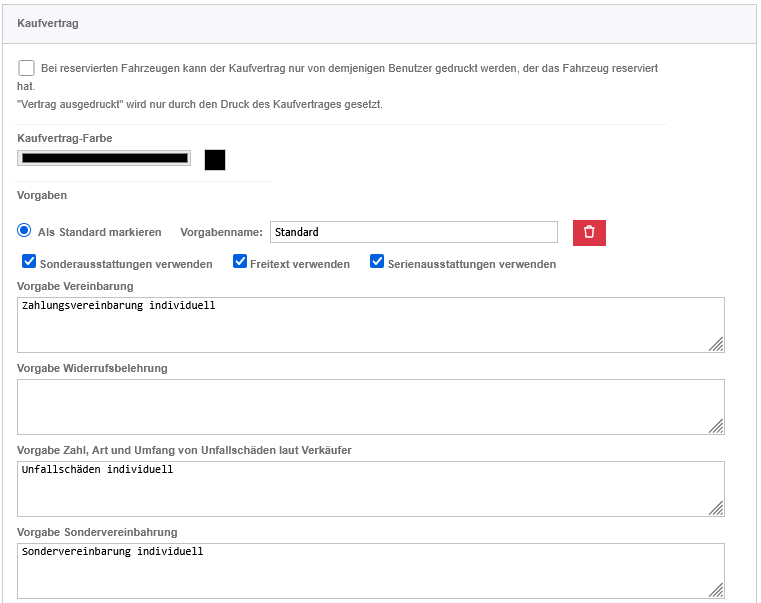
If further specifications are to be defined, this can be via the button are effected. One of the presets is set as default.
Invoice
In the Invoice pane, Presets and settings for the invoice printing can be stored:
Note:
- Other printed matter can also be configured in this area.
- Please note thePossible file formats and allowed content on files.