Vehicle detail page - Statistics and Analysis
The Statistics & Analysis section is divided into several areas:
Request
In demand area, rudimentary data on the vehicle is provided as available. Only marketing platforms that provide corresponding data can be considered. These are the one hand theMarketplaceas well asMarketplace Freeand theTrader Websitefrom pixelconcept, on the other hand also Mobile.de or Autoscout24.de. The course of the demand can also be displayed graphically via the icon on the right.
Market price analysis Mobile.com
In the area of Market Price Analysis Mobile.de, both the data of market price analysis and data of Mobile.de's price evaluation data are shown. There are different forms of representation by constellation and data situation.
Market price analysis
Without enabled market price analysis app enabled, this information appears:
With active market price analysis butNo sufficient data situationThis representation is made - manually a new attempt of the query can be started e.g. after adjusting the settings:
With active market price analysis and a sufficient comparison basis, this presentation is made. A detailed explanation is which functionalities isHereto be found:
Price rating of Mobile.de
The Mobile.co.uk price indicator is attempted to obtain data for all vehicles (without accident status). The indicator is updated daily.
Without enabled Mobile Export, a general location-independent price rating is obtained, whereby the price ranges are not always obtained:
With active Mobile Export, the location-dependent price assessment is carried out - here without transmitted price ranges. The Mobile.de customer number is mentioned here.
In constellations in which a vehicle is transmitted to several mobile accounts or there was a location-independent assessment first, several may also be able to: Different reviews are shown.:
Market price analysis AutoScout24.com
In this area - if the linked Autoscout24.de dealer account is authorized - corresponding market price analysis data by Autoscout24.de are displayed.
On the one hand, data for price rating are displayed:
In addition, data for competitive analysis is provided:
Data from Autoscout24.de can also be shown for listing quality:
Notes:
- Market price assessment, competitive analysis and listing quality data are not continuously compared. Nor is the data provided for all vehicles.
- The criteria of this function are set by Autoscout24.de.
Standtime Controller
With set up and usedStandtime ControllingInformation about the process steps and the process is displayed:
Further data can be called up via a hover over the respective process steps (1-x) - processing is also possible in the case of open processes.
Details about this will be inRange of service life controllingexplained.
Insights & Data Quality
In this area, information showing the listing, performance and market development is shown with Mobile.de interface and data accordingly at Mobile.de, information showing the listing, performance and market development.
Listing Quality
In the Listing Quality section, image number, description length and attribute coverage is given and rated with a percentage. The average percentage defines the overall rating.
Suggested search criteria
Search criteria present in comparable vehicles are mentioned and can either ignored or (correspondingUser rightsProvided) are activated directly on the vehicle. Suggestions once removed are no longer displayed.
Performance and Visibility
In this area, visibility, interest and contacts / leads are considered. Inferred, a sales probability is formed for vehicle ads younger than 60 days if available.
Market development
Market development is displayed graphically retroactively up to one year.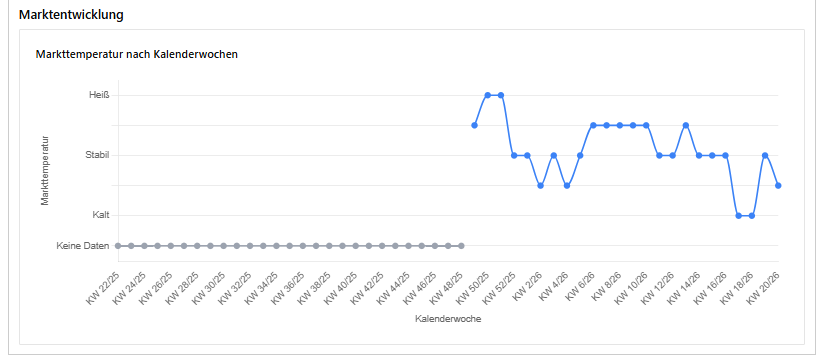
Notes:
- If only data parts are present, only these are displayed, e.g. only information on the listing quality.
- Please note that the data and conclusions on the quality in the Insights & Data Quality section are provided exclusively by Mobile.de. Questions about the rating and conclusions are asked to address Mobile.de.

The Customer will check them for accuracy with the third party at all times when transferring data from the Application to third-party providers offering vehicles.
The customer will use data provided by the provider in the application, in particular vehicle data, for automated preconfiguration of offers, exclusively within the scope of the application and will not make it any other use than that specified by the application, in the case of vehicle data exclusively for the creation of offers with the application.